Battleship is one of the best-known board games and has long been adapted into numerous digital versions that let players compete against a computer-controlled opponent. This article presents a Python implementation of the game with a graphical user interface built using tkinter.
In addition to creating a functional game, the goal was to develop an object-oriented application that could serve an illustrative example of how to use Python’s many language features, as well as to demonstrate object-oriented design, in which the game logic and the user interface are clearly separated.
The complete source code is included at the end of this article and is also available on GitHub: https://github.com/pythonknowledgebuilding/battleship
The first part of this article explains how to play the game. The second part explores the application’s architecture and the principles behind its design and implementation, with a particular focus on the design decisions behind the project. This section is intended primarily for readers interested in the program’s structure, as it provides the background needed to better understand the source code.
How to Play
This application is a computer implementation of the classic Battleship game, in which you compete against the computer. The game follows the traditional rules: both players place their fleets on separate 10×10 boards and then take turns trying to sink each other’s ships.
Getting Started
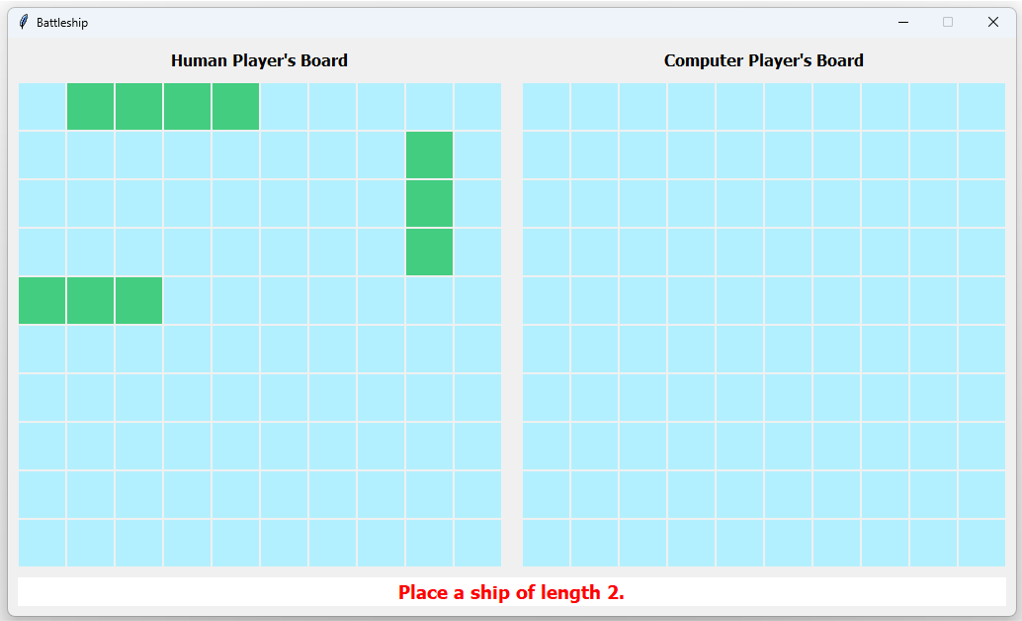
When the program starts, two game boards are displayed. The board on the left represents your fleet, while the board on the right represents the computer’s hidden fleet. At the beginning of the game, the program displays the size of the ship you need to place next.
Placing Your Ships
Ships are placed by clicking cells on your own board. The program always indicates the size of the next ship to be placed. You build a ship by selecting its cells one by one.
After each click, the program checks whether the currently selected cells can still form a valid ship. As a result, it is impossible to select a cell that would make the ship placement invalid.
The program enforces the standard Battleship placement rules:
- Ships may be placed only horizontally or vertically.
- A ship must occupy consecutive cells with no gaps.
- Ships may not touch each other, not even at the corners.
When a ship has been completed, an audible notification is played and the program automatically prompts you to place the next ship.
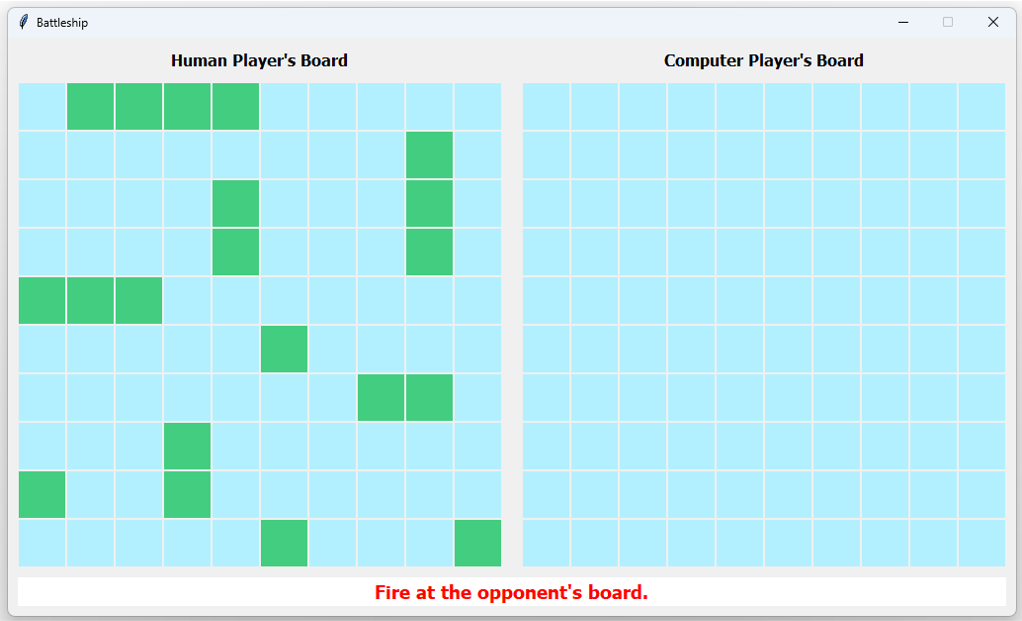
Once all ships have been placed, the game automatically enters the battle phase.
Battle Phase
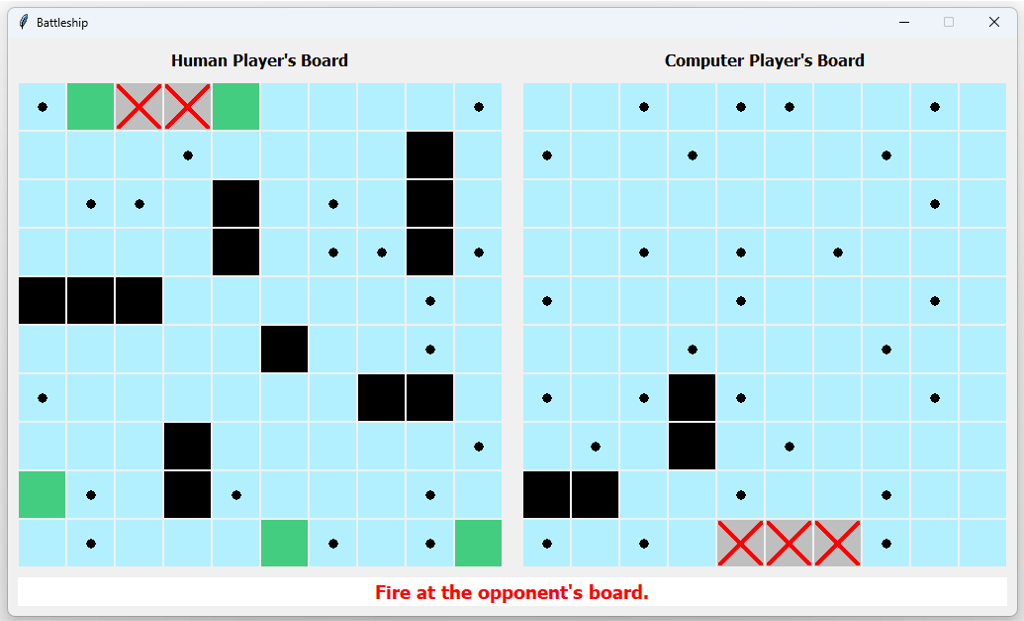
During the battle phase, fire at the opponent by left-clicking a cell on the board on the right.
The result of each shot is displayed immediately:
- Small black dot: the shot missed.
- Red X on a gray background: the shot hit a ship, but it has not yet sunk.
- Black cell: the entire ship has been sunk.
Each shot fired by the human player is automatically followed by the computer’s move, which is displayed on your own board using the same visual indicators.
End of the Game
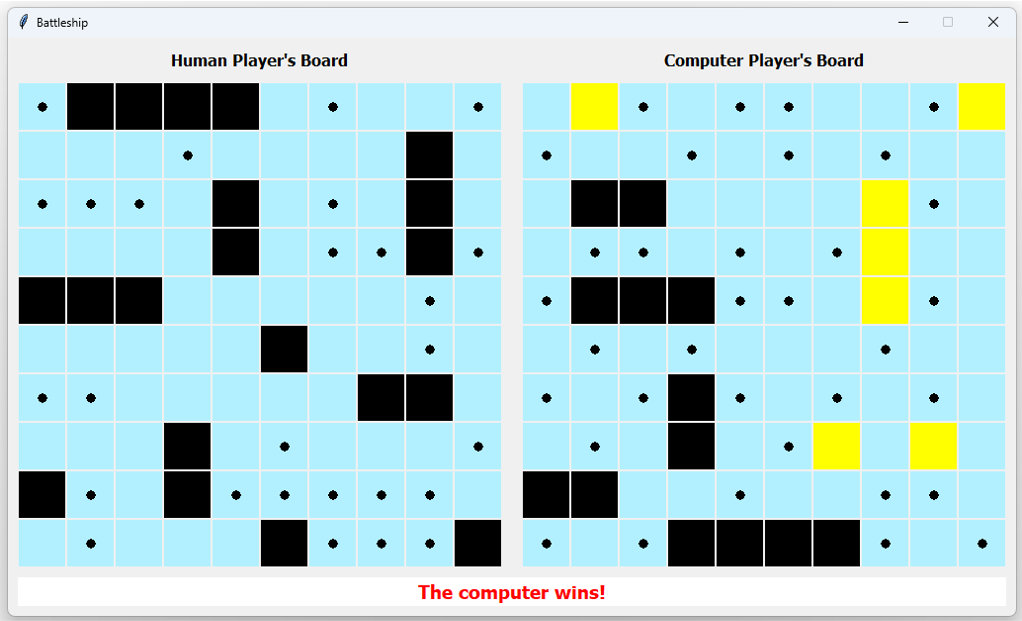
The game continues until all ships belonging to one player have been sunk. The program then displays a message announcing the winner.
Revealing the Opponent’s Undamaged Ships
Once the battle phase has begun, you can right-click the opponent’s board to reveal the locations of the computer player’s ship cells that have not yet been hit.
This feature is useful after losing a game, as it lets you see where the remaining enemy ships were located and which cells you would still have needed to find in order to win.
Screenshots
The following screenshots illustrate several key stages of the game, including ship placement, the battle phase, and the end of the game.
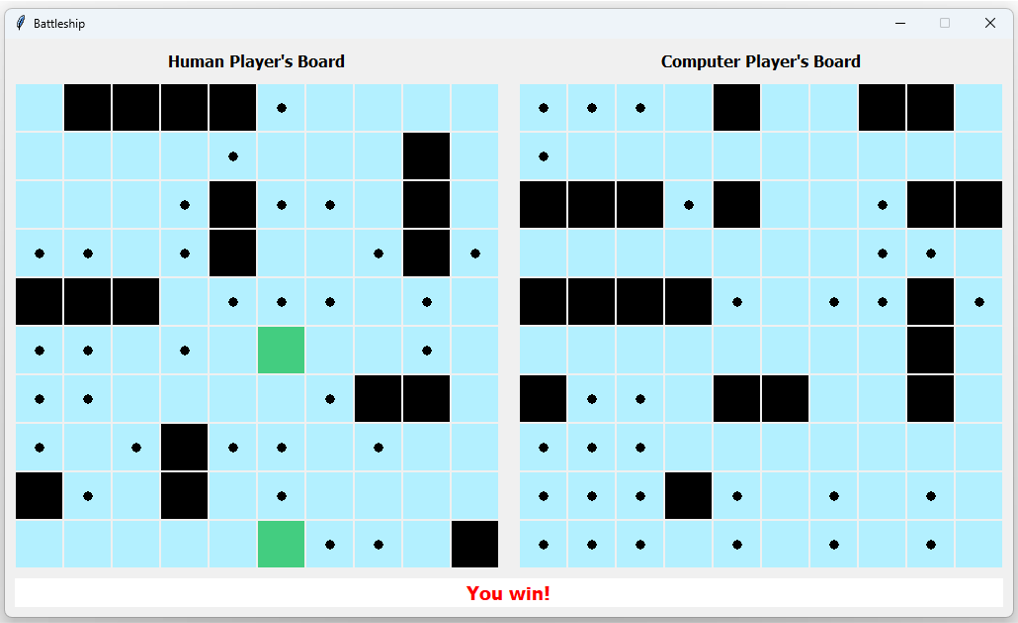
Application Architecture and Design
The program’s structure takes into account the principles of object-oriented design. Accordingly, the game logic, the user interface, and the event handling that controls the game are implemented as separate components.
Application Structure
The application consists of two modules.
The model module contains the complete game logic, including the game boards, ships, shot processing, the computer player’s behavior, and overall game state management. Since this module is entirely independent of the graphical interface, it can be reused with a different user interface, whether graphical or console-based.
The main module implements the tkinter-based graphical user interface. Its sole responsibility is to display the game boards, handle mouse input, and present the results provided by the model. All knowledge of the game rules resides exclusively in the model.
The overall design can be regarded as a simplified implementation of the Model–View–Controller (MVC) architecture. The responsibilities of the model and the view are clearly separated, while the controller role is performed by the BattleshipGame application object instead of a dedicated controller class. This object handles user events, forwards requests to the model, and updates the user interface based on the model’s responses.
The Game Model
The central component of the model is the Board class, which represents an individual player’s game board. It stores the ships placed on the board, keeps track of all shots fired at it, and provides the operations required for ship placement and shot evaluation.
Ships are represented as independent objects. A Ship instance stores only the cells it occupies, yet this is sufficient to derive all of its important properties, including its length, orientation, damage state, and whether it has been sunk. A ship is responsible for evaluating shots fired at it and for validating its own geometric properties. It also collaborates with the Board object when determining whether it can be placed legally.
Cell coordinates are represented by a dedicated Cell data class. Using a separate class provides a consistent representation of board positions, replacing simple coordinate pairs with well-defined objects. Since Cell is immutable (frozen=True), its instances can be used as elements of sets and as dictionary keys, which significantly simplifies several algorithms throughout the program.
Ship Placement
The computer player’s fleet is generated by the ComputerFleetFactory class. The algorithm repeatedly generates random horizontal or vertical ships and keeps trying new positions until a valid placement is found. Ships are not allowed to overlap or touch each other, even at the corners.
The human player’s ship placement follows a different approach. After each mouse click, the program generates every possible ship that:
- has the required length,
- contains all previously selected cells, and
- can be placed legally on the board.
If at least one valid ship can be constructed from the selected cells, the selection is accepted; otherwise, the click is ignored. This approach provides a simple and intuitive user experience while continuously enforcing the placement rules.
Shot Processing
Shot evaluation is performed in two stages. The Board object first determines whether a ship occupies the targeted cell. If so, the corresponding Ship object evaluates whether the shot is a hit or sinks the ship.
The result is represented by a member of the ShotResult enumeration, which clearly distinguishes the three possible outcomes: miss, hit, or sunk.
Computer Player Strategy
The computer player’s shooting algorithm employs two consecutive strategies.
As long as no ship has been hit, it selects target cells at random from those that have not yet been fired upon and that are guaranteed not to belong to an already sunk ship.
Once a ship has been hit, the strategy changes. With only a single damaged ship cell, the algorithm targets one of the four neighboring cells. As soon as two adjacent hits reveal the ship’s orientation, the search continues only toward the two ends of the ship until it has been completely sunk.
Design Summary
The objective of this project was not only to implement a playable game but also to develop a clean, maintainable object-oriented application. To achieve this, individual responsibilities are assigned to dedicated classes, cell coordinates are encapsulated in a dedicated data class, and many of the algorithms make extensive use of Python’s built-in data structures, particularly set operations. This design not only improves code readability but also makes the components easier to extend, modify, and maintain independently.
Everything you need to develop this application is covered in the e-book Python Knowledge Building Step by Step From the Basics to Your First Desktop Application.
Source Code
The complete source code of the program is shown below. The full project is also available on GitHub, where the source files can be downloaded.
|
1 2 3 4 5 6 7 8 9 10 11 12 13 14 15 16 17 18 19 20 21 22 23 24 25 26 27 28 29 30 31 32 33 34 35 36 37 38 39 40 41 42 43 44 45 46 47 48 49 50 51 52 53 54 55 56 57 58 59 60 61 62 63 64 65 66 67 68 69 70 71 72 73 74 75 76 77 78 79 80 81 82 83 84 85 86 87 88 89 90 91 92 93 94 95 96 97 98 99 100 101 102 103 104 105 106 107 108 109 110 111 112 113 114 115 116 117 118 119 120 121 122 123 124 125 126 127 128 129 130 131 132 133 134 135 136 137 138 139 140 141 142 143 144 145 146 147 148 149 150 151 152 153 154 155 156 157 158 159 160 161 162 163 164 165 166 167 168 169 170 171 172 173 174 175 176 177 178 179 180 181 182 183 184 185 186 187 188 189 190 191 192 193 194 195 196 197 198 199 200 201 202 203 204 205 206 207 208 209 210 211 212 213 214 215 216 217 218 219 |
# Python 3.11+ # module: main from __future__ import annotations import tkinter as tk from itertools import product import winsound from typing import cast, Callable from model import Cell, GameModel, ShotResult, GamePhase, Winner class BoardView(tk.Frame): """Displays a game board and defines methods shared by the human and computer player boards.""" def __init__(self, master, board_size: int) -> None: super().__init__(master) self._board_size = board_size if board_size > 10 else 10 # The classic game uses a minimum board size of 10×10. self._cell_canvases: dict[Cell, tk.Canvas] = {} # Maps each board cell to its corresponding canvas widget. self._create_cell_grid() def _create_cell_grid(self) -> None: """Creates and displays the cells of the game board.""" for row_index, column_index in product(range(self._board_size), repeat=2): grid_cell = Cell(row_index, column_index) cell_canvas = tk.Canvas(self, width='1.2c', height='1.2c', bg="#B3F0FF", bd=1, highlightthickness=0) cell_canvas.grid(row=row_index, column=column_index, padx=1, pady=1) self._cell_canvases[grid_cell] = cell_canvas def bind_cell_event(self, tk_event_descriptor: str, handler: Callable[[tk.Event], None]) -> None: """Binds the specified event and event handler to all board cells.""" for cell_widget in self._cell_canvases.values(): cell_widget.bind(tk_event_descriptor, handler) def update_on_shot(self, affected_cells: set[Cell], shot_result: ShotResult) -> None: """Updates the appearance of the specified board cells based on the shot result. If the shot is a miss, the first argument contains a single cell, and a small black dot is drawn on it. If the shot is a hit but the ship is not sunk, the first argument contains a single cell, which is colored gray and marked with a red X. If the shot sinks a ship, the first argument contains one or more cells, all of which are colored black. """ match shot_result: case ShotResult.MISS: self._update_miss(affected_cells.pop()) case ShotResult.HIT: self._update_hit(affected_cells.pop()) case ShotResult.SUNK: self._update_sunk(affected_cells) def _update_miss(self, cell: Cell) -> None: """Draws a small black dot on the specified cell.""" canvas = self._cell_canvases[cell] cnv_width, cnv_height = canvas.winfo_width(), canvas.winfo_height() canvas.create_oval(cnv_width * 0.4, cnv_height * 0.4, cnv_width * 0.6, cnv_height * 0.6, fill="black") def _update_hit(self, cell: Cell) -> None: """Colors the specified cell gray and marks it with a red X.""" canvas = self._cell_canvases[cell] cnv_width, cnv_height = canvas.winfo_width(), canvas.winfo_height() canvas.config(bg='grey75') canvas.create_line(0, 0, cnv_width, cnv_height, fill="red", width=4) canvas.create_line(0, cnv_height, cnv_width, 0, fill="red", width=4) def _update_sunk(self, cells: set[Cell]) -> None: """Colors the specified cells black.""" for cell in cells: canvas = self._cell_canvases[cell] canvas.delete('all') canvas.config(bg='black') class HumanBoardView(BoardView): """Panel for displaying the human player's board.""" def mark_as_ship_cell(self, cell: Cell): """Highlights the specified cell as part of a ship.""" self._cell_canvases[cell].config(bg="SeaGreen3") @staticmethod def play_ship_placement_sound() -> None: """Plays a sound prompting the player to place the next ship.""" winsound.PlaySound("SystemExclamation", winsound.SND_ASYNC) class ComputerBoardView(BoardView): """Panel for displaying the computer player's board.""" def mark_as_revealed_ship_cell(self, cell: Cell) -> None: """Highlights the specified cell belonging to an undamaged enemy ship.""" self._cell_canvases[cell].config(bg='yellow') class MessageView(tk.Frame): """Panel for displaying status messages.""" def __init__(self, master, control_variable: tk.StringVar) -> None: super().__init__(master) message_lbl = tk.Label(self, textvariable=control_variable, bg='white', fg='red', font=('Tahoma', 14, 'bold')) message_lbl.pack(fill='both', expand=True) class BattleshipGame(tk.Tk): """Main controller of the application, which also represents the main GUI window. It is responsible for creating the model and views, registering event handlers, and coordinating the game flow. """ def __init__(self, board_size: int = 10) -> None: super().__init__() self.title("Battleship") self.resizable(False, False) # Create the game model. self._game_model = GameModel(board_size) # Create and arrange the display panels. human_board_title = tk.Label(self, text="Human Player's Board", font=('Tahoma', 12, 'bold')) computer_board_title = tk.Label(self, text="Computer Player's Board", font=('Tahoma', 12, 'bold')) human_board_title.grid(row=0, column=0, padx=10, pady=(10, 0), sticky='news') computer_board_title.grid(row=0, column=1, padx=10, pady=(10, 0), sticky='news') self.human_board = HumanBoardView(self, board_size) self.computer_board = ComputerBoardView(self, board_size) self.human_board.grid(row=1, column=0, padx=10, pady=10) self.computer_board.grid(row=1, column=1, padx=10, pady=10) self.message = tk.StringVar(self, '') MessageView(self, self.message).grid(row=2, column=0, columnspan=2, padx=10, pady=(0, 10), sticky='news') # Specify which user-generated events the board cells should respond to and the corresponding event handlers. self.human_board.bind_cell_event("<Button-1>", self._place_human_ship) self.computer_board.bind_cell_event("<Button-1>", self._process_shot_on_computer_board) self.computer_board.bind_cell_event("<Button-3>", self._reveal_undamaged_computer_ship_cells) # Initial message prompting the player to place the first ship. self.message.set(f'Place a ship of length {self._game_model.get_next_human_ship_size()}.') # ----------------------------------- EVENT HANDLERS -------------------------------- def _place_human_ship(self, event: tk.Event) -> None: """Handles ship placement on the human player's board. If the selected cell belongs to the ship being placed, its appearance is updated accordingly. Once a ship has been completed, a sound is played and the player is prompted to place the next ship. After all ships have been placed, the game enters the battle phase. """ cell_canvas = cast(tk.Canvas, event.widget) clicked_cell: Cell = Cell(cell_canvas.grid_info()['row'], cell_canvas.grid_info()['column']) if self._game_model.game_phase == GamePhase.PLACEMENT: cell_is_ship_body, ship_completed = self._game_model.human_make_ship(clicked_cell) if cell_is_ship_body: # Visually indicate that the selected cell is part of a ship. self.human_board.mark_as_ship_cell(clicked_cell) if self._game_model.get_next_human_ship_size(): if ship_completed: # Notify the player to place the next ship. self.human_board.play_ship_placement_sound() self.message.set(f'Place a ship of length {self._game_model.get_next_human_ship_size()}.') else: # All ships have been placed, so the game enters the battle phase. self._game_model.game_phase = GamePhase.BATTLE self.message.set("Fire at the opponent's board.") def _process_shot_on_computer_board(self, event: tk.Event) -> None: """Processes the human player's shot at the computer's board. The shot result is displayed on the computer's board. If all ships are sunk, the game ends. """ cell_canvas = cast(tk.Canvas, event.widget) clicked_cell: Cell = Cell(cell_canvas.grid_info()['row'], cell_canvas.grid_info()['column']) if self._game_model.game_phase == GamePhase.BATTLE: shot_result, affected_cells = self._game_model.human_shoot(clicked_cell) self.computer_board.update_on_shot(affected_cells, shot_result) self._notify_upon_victory() # After the human player's turn, the computer takes its shot. self._computer_shoot() def _reveal_undamaged_computer_ship_cells(self, event: tk.Event) -> None: """Reveals the cells of the computer's ships that have not been hit. Has no effect during the ship placement phase. """ if self._game_model.game_phase != GamePhase.PLACEMENT: for cell in self._game_model.get_undamaged_computer_ship_cells(): self.computer_board.mark_as_revealed_ship_cell(cell) # ------------------------------------- HELPER METHODS ------------------------------ def _computer_shoot(self) -> None: """Processes the computer player's shot at the human player's board. The shot result is displayed on the human player's board. If all ships are sunk, the game ends. """ if self._game_model.game_phase != GamePhase.VICTORY: shot_result, affected_cells = self._game_model.computer_shoot() self.human_board.update_on_shot(affected_cells, shot_result) self._notify_upon_victory() def _notify_upon_victory(self) -> None: """Displays the winner and switches the game to the victory phase.""" if (winner := self._game_model.check_winner()) is not None: text = "You win!" if winner == Winner.HUMAN else "The computer wins!" self.message.set(text) self._game_model.game_phase = GamePhase.VICTORY def run(self) -> None: """Starts the game.""" self.mainloop() if __name__ == '__main__': battleship_game = BattleshipGame() battleship_game.run() |
|
1 2 3 4 5 6 7 8 9 10 11 12 13 14 15 16 17 18 19 20 21 22 23 24 25 26 27 28 29 30 31 32 33 34 35 36 37 38 39 40 41 42 43 44 45 46 47 48 49 50 51 52 53 54 55 56 57 58 59 60 61 62 63 64 65 66 67 68 69 70 71 72 73 74 75 76 77 78 79 80 81 82 83 84 85 86 87 88 89 90 91 92 93 94 95 96 97 98 99 100 101 102 103 104 105 106 107 108 109 110 111 112 113 114 115 116 117 118 119 120 121 122 123 124 125 126 127 128 129 130 131 132 133 134 135 136 137 138 139 140 141 142 143 144 145 146 147 148 149 150 151 152 153 154 155 156 157 158 159 160 161 162 163 164 165 166 167 168 169 170 171 172 173 174 175 176 177 178 179 180 181 182 183 184 185 186 187 188 189 190 191 192 193 194 195 196 197 198 199 200 201 202 203 204 205 206 207 208 209 210 211 212 213 214 215 216 217 218 219 220 221 222 223 224 225 226 227 228 229 230 231 232 233 234 235 236 237 238 239 240 241 242 243 244 245 246 247 248 249 250 251 252 253 254 255 256 257 258 259 260 261 262 263 264 265 266 267 268 269 270 271 272 273 274 275 276 277 278 279 280 281 282 283 284 285 286 287 288 289 290 291 292 293 294 295 296 297 298 299 300 301 302 303 304 305 306 307 308 309 310 311 312 313 314 315 316 317 318 319 320 321 322 323 324 325 326 327 328 329 330 331 332 333 334 335 336 337 338 339 340 341 342 343 344 345 346 347 348 349 350 351 352 353 354 355 356 357 358 359 360 361 362 363 364 365 366 367 368 369 370 371 372 373 374 375 376 377 378 379 380 381 382 383 384 385 386 387 388 389 390 391 392 393 394 395 396 397 398 399 400 401 402 403 404 405 406 407 408 409 410 411 412 413 414 415 416 417 418 419 420 421 422 423 424 425 426 427 428 429 430 431 432 433 434 435 436 437 438 439 440 441 442 443 444 445 446 447 448 449 450 451 452 453 454 455 456 457 458 459 460 461 462 463 464 465 466 467 468 |
# Python 3.11+ # module: model from __future__ import annotations from dataclasses import dataclass from enum import StrEnum, auto from itertools import product from random import randint, choice from typing import Iterator @dataclass(frozen=True) class Cell: row: int column: int def __add__(self, t: tuple[int, int]) -> Cell: return Cell(self.row + t[0], self.column + t[1]) class ShotResult(StrEnum): HIT = auto() MISS = auto() SUNK = auto() class GamePhase(StrEnum): PLACEMENT = auto() BATTLE = auto() VICTORY = auto() class Winner(StrEnum): HUMAN = auto() COMPUTER = auto() class InvalidShipShape(ValueError): pass class ShipOverlapError(ValueError): pass class Board: """Represents a player's game board.""" def __init__(self, size: int, ship_sizes: tuple[int, ...]) -> None: self.size = size # Number of rows and columns on the board. self.ship_sizes = ship_sizes # Sizes of the ships to be placed on the board. self._remaining_ship_sizes = list(self.ship_sizes) # Sizes of the ships that have not yet been placed. self._ships: list[Ship] = [] # Ships currently placed on the board. self.shots_received: set[Cell] = set() # Coordinates of all shots fired at this board. def __contains__(self, cell: Cell) -> bool: """Return True if the specified cell lies within the board.""" return 0 <= cell.row < self.size and 0 <= cell.column < self.size def __iter__(self) -> Iterator[Ship]: """Iterate over the ships placed on the board.""" yield from self._ships def add_ship(self, ship: Ship): """Add the specified ship to the board if it does not overlap with any existing ship. The ship's size is then removed from the list of remaining ship sizes. """ if not ship.can_be_placed_on(self): raise ShipOverlapError("The ship overlaps with an already placed ship.") if self._remaining_ship_sizes: self._ships.append(ship) self._remaining_ship_sizes.remove(ship.size) def get_cells(self) -> set[Cell]: """Return all cells on the board.""" return {Cell(row_index, column_index) for row_index, column_index in product(range(self.size), repeat=2)} def get_cells_available_to_target(self) -> set[Cell]: """Return the cells that are not occupied by sunken ships or their surrounding area.""" return self.get_cells() - {cell for sunken_ship in self.get_sunken_ships() for cell in sunken_ship.get_occupied_area()} def get_ship(self, cell: Cell) -> Ship | None: """Return the ship occupying the specified cell, or None if there is no such ship.""" return next((ship for ship in self if cell in ship), None) def get_sunken_ships(self) -> set[Ship]: """Return all ships that have been sunk.""" return {ship for ship in self if ship.is_sunk()} def process_shot(self, target_cell: Cell) -> ShotResult: """Return the result of firing at the specified cell.""" self.shots_received.add(target_cell) ship = self.get_ship(target_cell) if ship is not None: return ship.evaluate_shot(target_cell) return ShotResult.MISS def all_ships_sunk(self) -> bool: """Return True if all ships on the board have been sunk.""" return all(ship.is_sunk() for ship in self) def all_ships_placed(self) -> bool: """Return True if all ships have been placed on the board.""" return not self._remaining_ship_sizes class Ship: """Represents a ship on the game board.""" def __init__(self, cells: set[Cell]): if not self.valid_ship_shape(cells): raise InvalidShipShape("The provided cells do not form a valid ship.") # Maps ship cells to their hit status (True if the segment has been hit). self._cells_with_hit_states: dict[Cell, bool] = {cell: False for cell in cells} def __repr__(self) -> str: return f'{type(self).__name__}({set(self._cells_with_hit_states)})' def __str__(self) -> str: coords = {(c.row, c.column) for c in self._cells_with_hit_states.keys()} return f'{type(self).__name__}({coords})' def __contains__(self, cell: Cell) -> bool: """Return True if the specified cell is part of the ship.""" return cell in self._cells_with_hit_states @property def size(self) -> int: return len(self._cells_with_hit_states) @property def cells(self) -> set[Cell]: return set(self._cells_with_hit_states.keys()) def get_occupied_area(self) -> set[Cell]: """Return all cells occupied by the ship, including adjacent buffer zone cells where no other ship may be placed.""" return self._cells_with_hit_states.keys() | self._get_buffer_cells() def has_cells(self, *cells: Cell) -> bool: """Return True if all specified cells belong to this ship.""" return set(cells) <= self._cells_with_hit_states.keys() @staticmethod def valid_ship_shape(cells: set[Cell]) -> bool: """Check whether the cells form a valid contiguous horizontal or vertical ship.""" if not cells: return False rows = {cell.row for cell in cells} cols = {cell.column for cell in cells} is_horizontal = len(rows) == 1 # All cells share the same row index. is_vertical = len(cols) == 1 # All cells share the same column index. if is_horizontal: return max(cols) - min(cols) + 1 == len(cols) # Columns form a consecutive sequence. if is_vertical: return max(rows) - min(rows) + 1 == len(rows) # Rows form a consecutive sequence. return False def _get_buffer_cells(self) -> set[Cell]: """Return the buffer zone cells around the ship where no other ship may be placed.""" buffer_cells = set() for cell in self._cells_with_hit_states: for shift in [(-1, -1), (0, -1), (+1, -1), (+1, 0), (+1, +1), (0, +1), (-1, +1), (-1, 0)]: neighbor = cell + shift if neighbor not in self._cells_with_hit_states: buffer_cells.add(neighbor) return buffer_cells def can_be_placed_on(self, board: Board) -> bool: """Return True if the ship can be placed on the board without overlapping existing ships.""" return (all(cell in board for cell in self._cells_with_hit_states) and not any(self.is_overlapped(_ship) for _ship in board)) def evaluate_shot(self, target_cell: Cell) -> ShotResult: """Evaluate a shot fired at the ship and returns the result (miss, hit, or sunk).""" if target_cell not in self._cells_with_hit_states: return ShotResult.MISS self._cells_with_hit_states[target_cell] = True return ShotResult.SUNK if self.is_sunk() else ShotResult.HIT def cell_is_damaged(self, cell: Cell) -> bool: """Return True if the specified ship cell has been hit.""" return self._cells_with_hit_states.get(cell, False) def is_sunk(self) -> bool: """Return True if all segments of the ship have been hit.""" return all(self._cells_with_hit_states.values()) def is_overlapped(self, ship: Ship) -> bool: """Return True if this ship overlaps or touches another ship (including buffer zones).""" return bool( self._cells_with_hit_states.keys() & ship._cells_with_hit_states.keys() or self._cells_with_hit_states.keys() & ship._get_buffer_cells() ) class ComputerFleetFactory: """Responsible for generating the computer player's fleet.""" def __init__(self, computer_board: Board): self.board = computer_board def _create_ship_cells(self, ship_size: int) -> set[Cell]: """Randomly generates a set of cells for a ship of the given size, placed either horizontally or vertically within the board boundaries. """ horizontal = choice([True, False]) if horizontal: row_index = randint(0, self.board.size - 1) col_index = randint(0, self.board.size - ship_size) # Column index of the first cell (leftmost). return {Cell(row_index, col_index + i) for i in range(ship_size)} else: row_index = randint(0, self.board.size - ship_size) # Row index of the first cell (topmost). col_index = randint(0, self.board.size - 1) return {Cell(row_index + i, col_index) for i in range(ship_size)} def produce_ships(self) -> None: """Generates the full fleet and places it on the board.""" for ship_size in self.board.ship_sizes: placed = False while not placed: cells = self._create_ship_cells(ship_size) ship = Ship(cells) try: self.board.add_ship(ship) except ShipOverlapError: continue # Retry if the ship overlaps with an existing one. else: placed = True # Successful placement. class ComputerPlayer: """Computer player that randomly places ships and fires at the opponent's board.""" def __init__(self, computer_board: Board): self.computer_board = computer_board self._human_ship_damaged_cells: list[Cell] = [] self._cells_already_shot: set[Cell] = set() def place_ships(self): factory = ComputerFleetFactory(self.computer_board) factory.produce_ships() def shoot(self, human_board: Board) -> tuple[ShotResult, set[Cell]]: """Select a random target cell on the human player's board, avoiding previously fired shots. If a ship is hit, the computer continues targeting nearby cells until the ship is sunk. Only after sinking the ship does it switch back to random targeting. """ # If no ship segment has been hit yet, choose a random target; otherwise continue targeting the currently hit ship. if not self._human_ship_damaged_cells: target_cell = self._choose_random_target_cell(human_board) else: target_cell = self._choose_target_cell_to_sink(human_board) shot_result = human_board.process_shot(target_cell) if shot_result == ShotResult.HIT: self._human_ship_damaged_cells.append(target_cell) if shot_result == ShotResult.SUNK: self._human_ship_damaged_cells.clear() affected_cells = set() if shot_result in (ShotResult.MISS, ShotResult.HIT): affected_cells = {target_cell} elif shot_result == ShotResult.SUNK: ship = human_board.get_ship(target_cell) assert ship is not None # If the ship is sunk, the target cell must belong to it. affected_cells = set(ship.cells) return shot_result, affected_cells @staticmethod def _choose_random_target_cell(human_board: Board) -> Cell: """Choose a random target cell on the human player's board, avoiding previously shot cells and buffer zones of sunken ships. """ target_cell = choice(list(human_board.get_cells_available_to_target() - human_board.shots_received)) return target_cell def _choose_target_cell_to_sink(self, human_board: Board) -> Cell: """Choose the next target cell in order to sink a partially discovered ship. The selection strategy tries to extend the currently hit ship segment in either horizontal or vertical direction. """ potential_target_cells: tuple[Cell, ...] = () if len(self._human_ship_damaged_cells) == 1: # If only one segment has been hit, try adjacent cells in all four directions. left_cell = self._human_ship_damaged_cells[0] + (-1, 0) right_cell = self._human_ship_damaged_cells[0] + (+1, 0) top_cell = self._human_ship_damaged_cells[0] + (0, -1) bottom_cell = self._human_ship_damaged_cells[0] + (0, +1) potential_target_cells = (left_cell, right_cell, top_cell, bottom_cell) elif len(self._human_ship_damaged_cells) > 1: # If multiple segments are hit, determine ship orientation and target the ends of the detected ship. if len({cell.row for cell in self._human_ship_damaged_cells}) == 1: # Horizontal ship: target cells left and right of the endpoints. left_cell = min(self._human_ship_damaged_cells, key=lambda c: c.column) + (0, -1) right_cell = max(self._human_ship_damaged_cells, key=lambda c: c.column) + (0, +1) potential_target_cells = (left_cell, right_cell) elif len({cell.column for cell in self._human_ship_damaged_cells}) == 1: # Vertical ship: target cells above and below the endpoints. top_cell = min(self._human_ship_damaged_cells, key=lambda c: c.row) + (-1, 0) bottom_cell = max(self._human_ship_damaged_cells, key=lambda c: c.row) + (+1, 0) potential_target_cells = (top_cell, bottom_cell) # Filter only valid board cells selectable_cells = [cell for cell in potential_target_cells if cell in human_board] while True: target_cell = choice(selectable_cells) if target_cell not in human_board.shots_received: return target_cell class HumanFleetFactory: """Responsible for creating the human player's fleet.""" def __init__(self, human_board: Board): self.board = human_board self.ship_sizes_to_build = list(self.board.ship_sizes) self.current_ship_size_to_build: int = self.ship_sizes_to_build[0] self._selected_human_ship_cells: list[Cell] = [] def assemble_ship(self, cell: Cell) -> tuple[bool, bool]: """Processes the selection of a cell during human ship placement. Determines whether the selected cell can be part of the current ship being assembled. If the selection completes a ship, the ship is added to the board and the factory moves on to the next ship size. """ if cell in self._selected_human_ship_cells: return False, False cell_is_ship_body, ship_completed = False, False if not self.board.all_ships_placed(): self._selected_human_ship_cells.append(cell) self.current_ship_size_to_build = self.ship_sizes_to_build[0] allowed_cells = self._get_possible_human_ship_cells(self.current_ship_size_to_build, *self._selected_human_ship_cells) if any(cell in _cells for _cells in allowed_cells): cell_is_ship_body = True if len(self._selected_human_ship_cells) == self.current_ship_size_to_build: self.board.add_ship(Ship(set(self._selected_human_ship_cells))) ship_completed = True self._selected_human_ship_cells.clear() self.ship_sizes_to_build.pop(0) else: self._selected_human_ship_cells.pop() return cell_is_ship_body, ship_completed def _get_possible_human_ship_cells(self, size: int, *cells: Cell) -> tuple[set[Cell], ...]: """Return all possible ship cell configurations of the given size that include the specified cells.""" r0, c0 = cells[0].row, cells[0].column # All possible horizontal ship candidates including the anchor cell. horizontal_candidates = [ship for i in range(-(size - 1), 1) if (ship := Ship({Cell(r0, c0 + s + i) for s in range(size) })).can_be_placed_on(self.board) ] # Horizontal ships that also satisfy all selected constraints. valid_horizontal_ships = [ship for ship in horizontal_candidates if ship.has_cells(*cells)] # All possible vertical ship candidates including the anchor cell. vertical_candidates = [ship for i in range(-(size - 1), 1) if (ship := Ship({Cell(r0 + s + i, c0) for s in range(size) })).can_be_placed_on(self.board) ] # Vertical ships that also satisfy all selected constraints. valid_vertical_ships = [ship for ship in vertical_candidates if ship.has_cells(*cells)] return tuple(ship.cells for ship in valid_horizontal_ships + valid_vertical_ships) class GameModel: """Core game model that manages the game state, rules, and interactions between the human and computer players. It coordinates board state, ship placement, shooting mechanics, and determines the winner of the game. """ def __init__(self, board_size=10): self.board_size = board_size if board_size > 10 else 10 # Number of rows and columns. self.ship_sizes = (4, 3, 3, 2, 2, 2, 1, 1, 1, 1) # Sizes of ships to be placed (in number of cells). self.current_shipsize_to_build = self.ship_sizes[0] # Initialize boards for human and computer players. self.human_board = Board(self.board_size, self.ship_sizes) self.computer_board = Board(self.board_size, self.ship_sizes) # Create the computer player. self.computer_player = ComputerPlayer(self.computer_board) self.game_phase = GamePhase.PLACEMENT # Initial phase: ship placement. # Let the computer place its ships. self.computer_player.place_ships() # Create the factory responsible for human ship placement. self.human_fleet_factory = HumanFleetFactory(self.human_board) def human_make_ship(self, cell: Cell) -> tuple[bool, bool]: """Determine whether the selected cell on the human player's board can be part of the currently constructed ship. The first return value indicates whether the cell is a valid part of the ship. The second indicates whether the ship has been fully completed and placed. If all ships have been placed, the game transitions to the battle phase. """ if self.human_board.all_ships_placed(): self.game_phase = GamePhase.BATTLE return False, False return self.human_fleet_factory.assemble_ship(cell) def human_shoot(self, target_cell: Cell) -> tuple[ShotResult, set[Cell]]: """Evaluate a shot fired by the human player at the computer player's board. Returns the shot result and the affected cells: - If the shot is a miss or hit, returns the target cell. - If a ship is sunk, returns all cells occupied by that ship. """ shot_result = self.computer_board.process_shot(target_cell) affected_cells = set() if shot_result in (ShotResult.MISS, ShotResult.HIT): affected_cells = {target_cell} elif shot_result == ShotResult.SUNK: ship = self.computer_board.get_ship(target_cell) assert ship is not None # If the ship is sunk, the target cell must belong to it. affected_cells = set(ship.cells) return shot_result, affected_cells def computer_shoot(self) -> tuple[ShotResult, set[Cell]]: """Evaluate a shot fired by the computer player at the human player's board.""" return self.computer_player.shoot(self.human_board) def check_winner(self) -> Winner | None: """Return the winner of the game, if any. Otherwise, returns None.""" if self.human_board.all_ships_sunk(): return Winner.COMPUTER elif self.computer_board.all_ships_sunk(): return Winner.HUMAN else: return None def get_undamaged_computer_ship_cells(self) -> set[Cell]: """Return all computer ship cells that have not been hit yet.""" return {cell for ship in self.computer_board for cell in ship.cells if not ship.cell_is_damaged(cell)} def get_next_human_ship_size(self) -> int | None: """Return the size of the next ship the human player must place. Return None if all ships have already been placed.""" return next(iter(self.human_fleet_factory.ship_sizes_to_build), None) |
GitHub: https://github.com/pythonknowledgebuilding/battleship