In Python scripts, you may sometimes see a code block starting with if __name__ == ‘__main__‘:, but it’s not always there. Why is that?
The answer lies in the fact that code written in a .py file can be used and executed in two different roles:
- We can import it into another script as a module.
- We can run it independently.
The purpose of the latter is often to test the module. In such cases, we place testing code within the module. Even after successful tests, we might not want to remove this code, as it could be useful later or help the module’s users understand how it works.
Role of __main__ within a Module
The problem is that these extra lines of code also run during import, which is generally undesirable. Python solves this by setting the module’s __name__ attribute to the name of the module file when the module is imported. However, if the module is run independently, __name__ is automatically assigned the string ‘__main__’ . This is what is checked with the if __name__ == ‘__main__’: conditional. The code block within this conditional statement will only execute if the file is run directly. Therefore, any test code should be placed inside this block.
Role of __main__ in Packages
However, you may encounter __main__ not only in this context, but also with packages.
It is commonly known that when a package is imported or something is imported from it, the lines of code in __init__.py of the package are executed once. If you use this file, for example, to import one or more of the package’s modules, the names of those modules will become available in the package’s namespace. This means that after importing the package, these modules can be accessed directly by their names through the package object.
What is perhaps less well known, however, is that packages can not only be imported but also run, provided that a module named __main__.py is created within the package. When the package is run, the code contained in the __main__.py file will be executed. This can be used, for instance, to test the package.
In short: when importing the package, __init__.py runs, and when executing it, __main__.py runs.
Illustrative Example
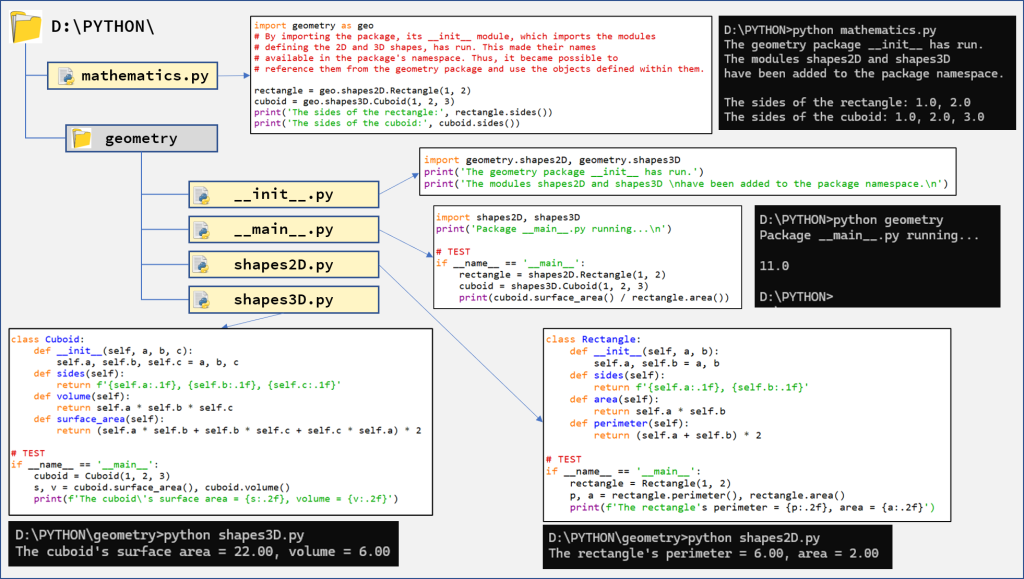
To better understand the above points, we’ll create a package called geometry with the structure shown in the figure below. In this package, there will be two modules for modeling 2D and 3D shapes. In addition to __init__.py, we also create a __main__.py file. The contents of each file are shown in the figure. We tested the shapes2D and shapes3D modules independently, as you can see in the command line screenshots at the bottom of the figure. We also tested the geometry package by running it directly. The result is shown on the right side of the figure, next to the __main__.py code.
We use the geometry package in a program contained in mathematics.py, so we import the package there. When mathematics.py is run, the package’s __init__.py module runs first, due to the import, followed by the rest of the code in mathematics.py. The result of these operations can be seen in the top right corner of the figure.
Further details about creating modules and packages and how they work can be found in the chapter „Modules – building blocks of reusable code” in the e-book Python Knowledge Building Step by Step.